
Set up your table
Choose the piles, rows and hands every playtest starts with, and which cards go where.
Open Table setup
In the editor, select Playtest → Table setup. The preview in the middle is the table every new game starts from.
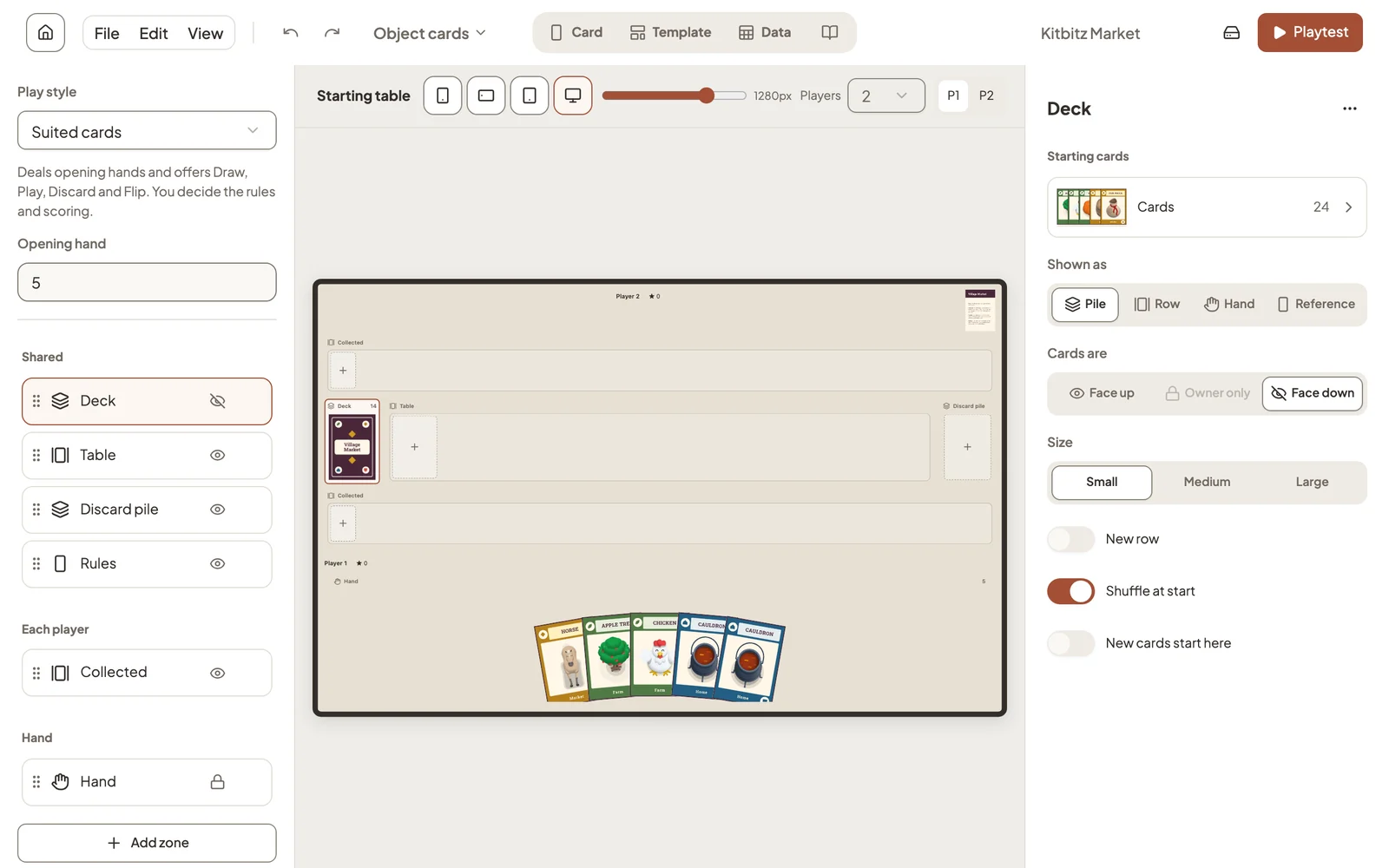
Zones
A zone is a place cards can sit. Shared zones belong to the whole table, Each player zones are repeated for every player, and Hand is each player’s private hand. Drag zones to reorder them, or choose Add zone.
Select a zone to change it:
- Starting cards: which cards begin here.
- Shown as: a pile, a row, a hand, or a single reference card such as a rules summary.
- Cards are: face up, face down, or visible to their owner only.
- Shuffle at start: shuffle this zone when a game begins.
- New cards start here: cards you add to the project later go to this zone.
Check it fits
The buttons above the preview show the table on a phone, a tablet and a desktop screen, and Players shows it for different player counts. Set how many players your game supports in the rulebook.
Play style
Play style decides how much the table does for you, from nothing at all to dealing hands and tracking turns. See Choose how your game plays.
Still stuck?
Email support@dreamboard.games and tell us what you are trying to do.